

Focal point
Log in to add to favouritesPage last updated 07 October 2026
The fp parameter defines a point in the source image that a crop should be composed around. The crop position decides where that point lands in the output, so the subject of an image stays in frame whatever aspect ratio it is cropped to.
Setting a focal point
The value is two comma separated numbers, fp=x,y, measured from the top-left of the image. Both are in the range 0 to 1, where 0.5,0.5 is the centre of the image. Because the values are relative, the same focal point applies at any size, and still applies if the image is replaced with one of different dimensions. Values are used to four decimal places, the precision Contensis stores a focal point at.
Editors set a focal point against an image in Contensis, and the Delivery API returns it in one of two places:
- If the image field has image dimension restrictions, the focal point is already included in the image's
transformationsand in thesys.uriof the asset, so the URI can be used as it is. - If the entry references the image without restrictions, read the
focalPointfield from the asset and append it to your own transformation asfp=x,y.
"smallImageWithCrop": {
    "isDecorative": false,
    "altText": "city canal",
    "caption": "",
    "asset": {
        "entryTitle": "city canal",
        "entryDescription": null,
        "focalPoint": {
            "x": 0.2793,
            "y": 0.5623
        },
        "sys": {
            "id": "0cf6379f-60d1-49bc-83fa-24a2e5122831",
            "language": "en-GB",
            "contentTypeId": "image",
            "dataFormat": "asset",
            "uri": "/sample-images/normal/city-canal.x378ec988.jpg?w=200&h=200&fp=0.7856,0.2207"
        }
    },
    "transformations": "w=200&h=200&fp=0.7856,0.2207"
}
Crop to a focal point
A focal point can be used with the crop fit and with an anchored crop. In this example the lighthouse, at 64% across and 56% down the image, is placed at the centre of a 400x400 crop.
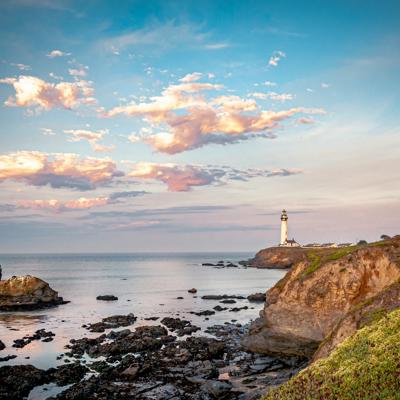
Without the focal point, the same request crops from the centre of the image, leaving the lighthouse at the edge of the frame.
Crop position with a focal point
The crop position sets where the focal point sits within the output image, rather than which part of the image is kept. Using fit=crop-top places the focal point against the top edge of the crop, leaving space below it. This is useful where a caption or headline needs to sit alongside the subject.
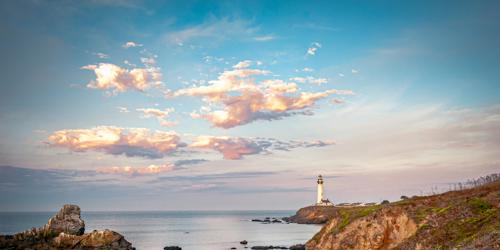
Anchored crop with a focal point
An anchored crop extracts a region of a set size. Resizing the image first controls how tightly the subject is framed, and the focal point positions the region within it.
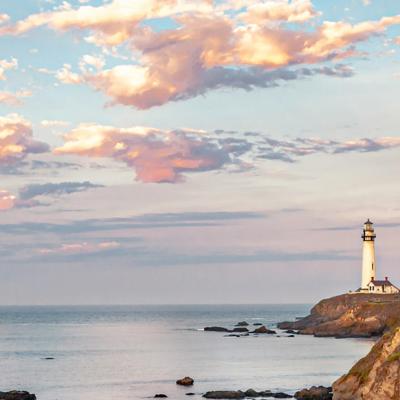
Parameter order
Where a width and height are followed by fp with no fit, a crop to those dimensions is applied automatically, so ?width=400&height=400&fp=0.64,0.56 returns the same image as the first example above.
Behaviour
- A focal point has no effect on an exact crop, which already defines the region to extract, or on the fit values that do not crop.
- A crop cannot extend beyond the edge of the image. Where the focal point is close to an edge the crop is moved as far towards it as possible, and the focal point sits nearer that edge of the output than the crop position specifies.
- Values outside the range 0 to 1 are clamped into the image. A value that cannot be read is ignored and the request is processed as though no focal point was given.
- Only the first focal point in a request is used, and it applies to the first crop in the request.
- A request containing only a focal point is not an Image API request, and the original image is returned.