
Exact crop
Log in to add to favouritesPage last updated 07 October 2026
An exact crop defines a region of the original image with a given width and height and coordinates where the crop should be started.
The value for crop is four values representing the width and height and the starting coordinates of x and y all separated by commas. The width and height must be greater than 0, and the coordinates 0 or greater. The coordinates are measured from the top left of the image as it is at that point in the request, so a resize earlier in the URL changes what they refer to.
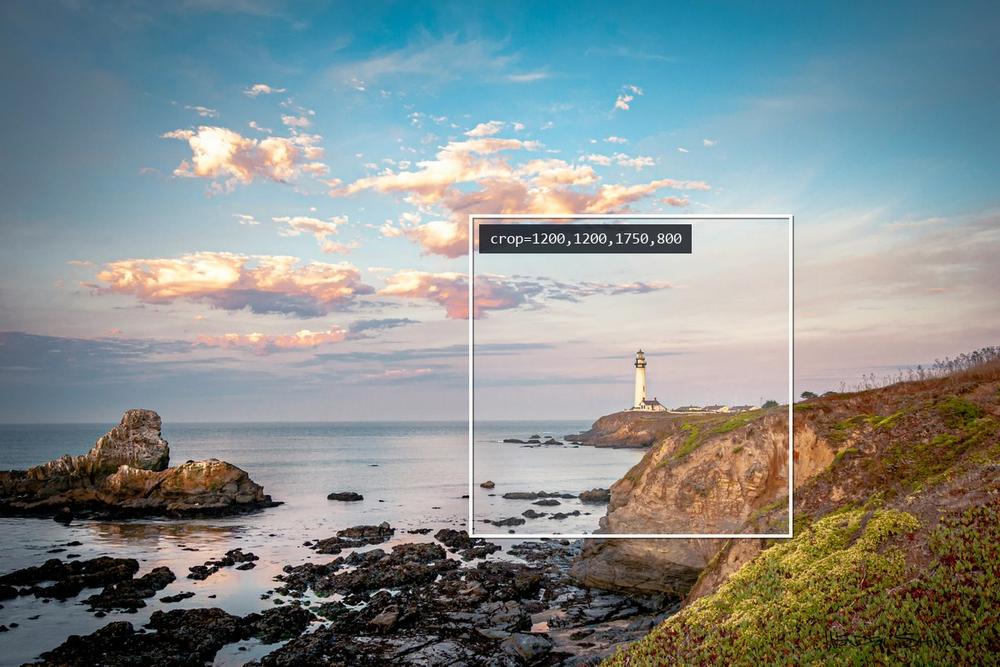
The rectangle outlined in the image will be used for the crop, and is defined by the following parameters crop=1200,1200,1750,800
An exact crop of 1200x1200 from specific coordinates

Regions that fall outside the image
A region that extends beyond the right or bottom edge of the image is reduced to the part that falls within it, so the result is smaller than the width and height requested. A region that starts outside the image altogether is ignored and the image is returned uncropped. Neither case is reported as an error, so coordinates calculated against the wrong dimensions fail quietly.
Because the coordinates are absolute, they only suit one version of an image. Where an image may be replaced with one of different dimensions, a focal point is more durable, as it is measured as a proportion of the image. A focal point has no effect on an exact crop, which already defines the region to extract.