

Contensis 17.2: Smarter content reviews and AI tools for confident publishing

As digital estates grow, keeping content accurate, compliant, and up to date becomes increasingly challenging. Content teams are managing more pages across more channels, often under tight deadlines and with limited resources – and relying on reminders and spreadsheets to stay on top of it all is no longer sustainable.
Contensis 17.2 introduces a more structured, automated approach to content governance, new bulk actions for managing content at scale, and AI-powered tools that help editors with everyday writing, editing, and maintenance tasks. Together, these features help teams stay in control as content volumes grow – supporting confident publishing where accuracy and consistency matter most.
Maintain content accuracy with automated review cycles
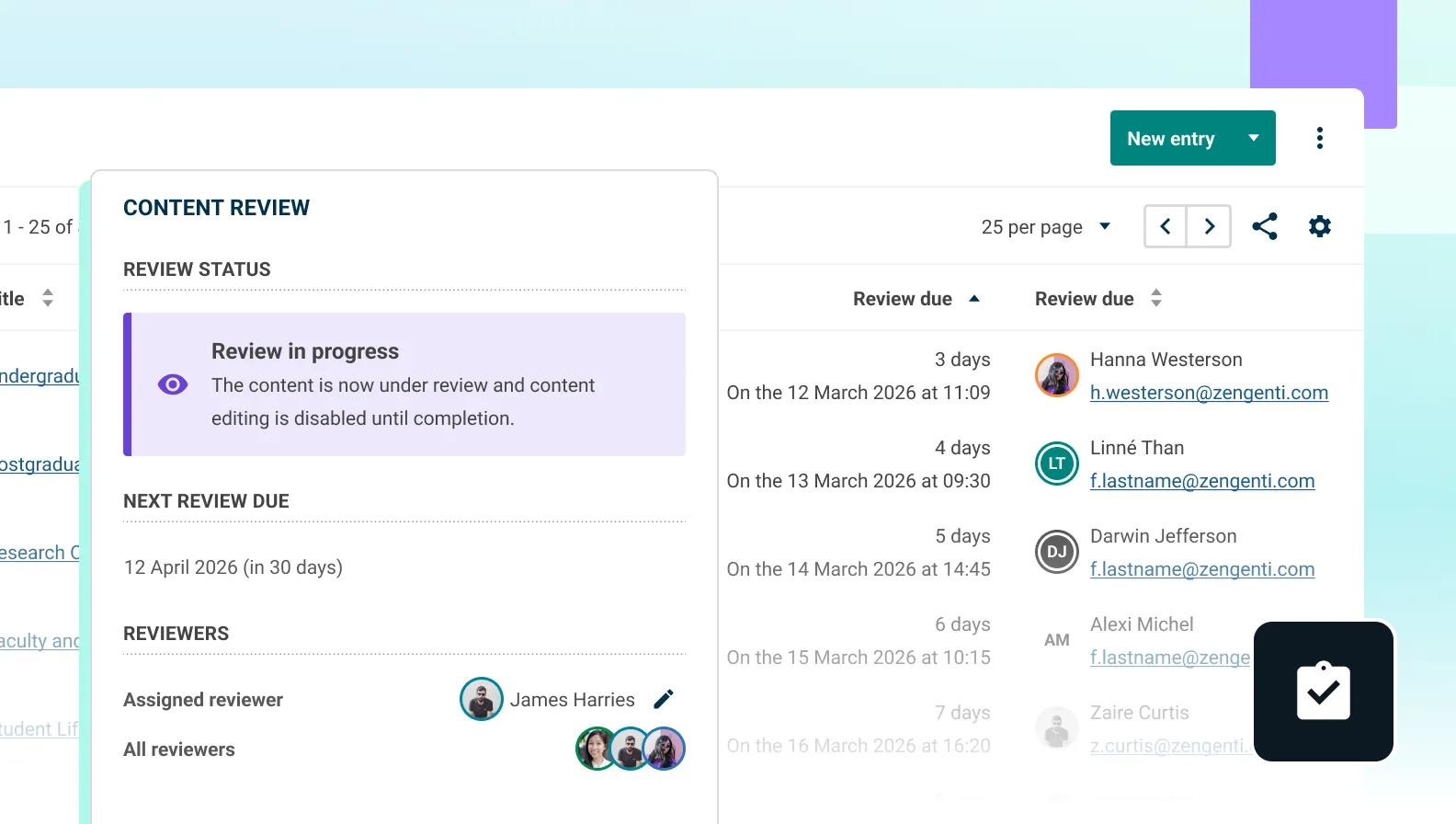
Regular content reviews help to keep content accurate, compliant, accessible, and aligned with organisational processes, rather than quietly becoming outdated or risky over time. By assigning content to the right team members for regular review, maintenance becomes a routine, manageable activity instead of a disruptive and costly clean-up every few years.
The new content reviews feature introduces a more structured, automated approach to governance. Rather than relying on calendar reminders or spreadsheets, you can now use content reviews to:
- Schedule recurring or on-demand reviews – Enable scheduled reviews for key content types – like policies or service information – so they’re automatically flagged for review at regular intervals. You can also request reviews ad hoc when content needs extra attention.
- Assign and manage reviewers – Choose who is responsible for each content item, whether it’s a subject matter expert, content owner, or compliance lead. Reviewer assignments are clear and manageable in the review panel.
- Easily track review progress – View review status directly in the entry listing, from within the entry editor, or by setting up custom views using ZenQL filters. This makes it straightforward to monitor what’s due, what’s been reviewed, and what still needs attention – supporting governance and editorial oversight.
- Automated reminders – Reviewers receive notifications before and after deadlines, so nothing slips through the cracks.
Content reviews are especially useful when managing content that is time sensitive or subject to regulatory, legal, or accessibility requirements.
For example, a public sector organisation could expose itself to legal risk, user complaints, or reputational damage if statutory guidance, service descriptions, or eligibility information on its website becomes outdated or inaccurate.
Using the new content reviews feature, critical pages can be scheduled for regular review by the appropriate subject matter experts, with automatic reminders and a clear audit trail showing when content was last checked and approved.
Manage content at scale with bulk actions
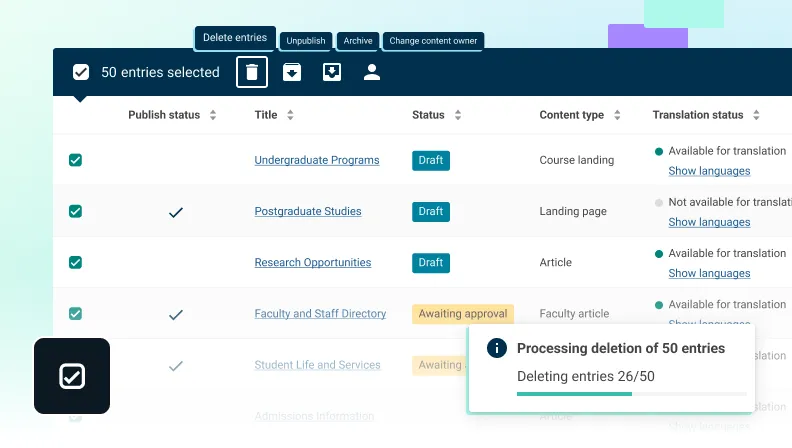
As content volumes grow, day-to-day management tasks can quickly become repetitive and time-consuming. Whether you’re cleaning up outdated entries, responding to organisational changes, or preparing a large content set for archival, working item by item slows teams down and increases the risk of inconsistency.
Contensis 17.2 introduces bulk actions in the entries listing screen, allowing you to apply key management actions to multiple entries at once. This helps teams work more efficiently while maintaining control and oversight.
You can now:
- Bulk delete entries – Remove multiple unwanted or obsolete items in a single action, reducing manual clean-up time.
- Bulk unpublish entries – Quickly take a set of entries offline, for example when information is no longer valid or requires review.
- Archive or unarchive in bulk – Manage large content sets more easily by archiving outdated material or restoring archived content when needed.
- Bulk change content owner – Reassign ownership across multiple entries at once, particularly useful during team restructures, role changes, or when redistributing responsibility for ongoing maintenance.
Bulk actions are especially valuable when combined with content reviews. For example, if a review highlights a group of outdated entries, editors can archive or unpublish them in one step. Similarly, if ownership changes as part of a governance update, content can be reassigned quickly and consistently without manual updates to each individual entry.
Together, these improvements support more efficient content operations, helping teams manage larger digital estates with less administrative overhead and greater confidence.
Accelerate editing with AI-powered assistance
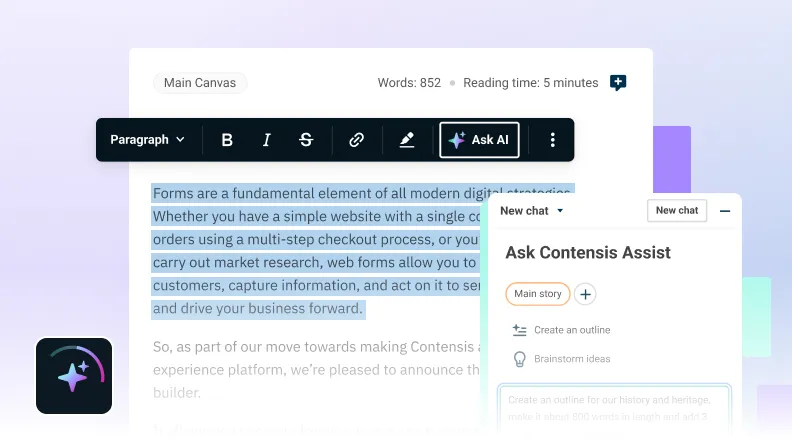
Alongside the new content reviews and bulk actions features, Contensis 17.2 introduces several AI-powered editorial tools to help teams create, refine, and maintain content more efficiently. These tools are designed to support editors with routine, time-consuming tasks – freeing them up to focus on the work that requires their expertise and judgement.
The new tools include:
- AI Canvas Assist – a built-in toolbox of AI actions in the Canvas editor that helps editors quickly shorten, lengthen, simplify, or summarise content. It’s designed for tasks like writing SEO descriptions or repurposing content for different contexts.
- Brand Voice – a feature that lets organisations train Contensis on their own content to create reusable brand voices, which can be used to check whether new content is on-brand or rewrite it in the correct tone.
- AI-powered asset support – tools that generate titles, captions, alt text, and keyword tags automatically, helping teams save time on repetitive tasks while improving accessibility and metadata quality.
The new AI features in Contensis 17.2 will be rolled out gradually, rather than enabled for every customer immediately on upgrade. Upgrading to 17.2 is required to be eligible, and we’ll then enable AI in phases as we bring customers onboard. If your organisation would prefer not to use AI features, you’ll be able to opt out and we won’t enable them for your environment.
For customers who do enable AI, we’ll include a monthly allowance of tokens as part of your licence. This rollout helps us validate usage patterns so we can optimise the experience and the included token allowance over time.
Upgrade now
If you’re ready to upgrade to Contensis 17.2, contact Support and we’ll help you plan the upgrade and rollout. If you’d like a walkthrough of the new content governance tools, bulk actions, or AI-assisted features, book a short demo with our team and we’ll tailor it to your organisation’s setup.