

Authenticate a Contensis webhook
Log in to add to favouritesPage last updated 02 February 2026
Securely authenticate Contensis webhook requests using a shared secret header to ensure only authorised services can receive data.
Why authentication matters
Webhooks are public HTTP endpoints. Without authentication, anyone who knows the URL could post data to it. By validating a secret header or signature you ensure:
- the request came from your Contensis instance (or authorised service)
- the payload hasn’t been tampered with
- malicious or accidental requests are rejected automatically
How Contensis webhook authentication works
When you configure a webhook in Contensis, you can specify a secret key. Every time Contensis sends a webhook request, it will include that key in the HTTP header. An example of this would be X-Webhook-Secret.
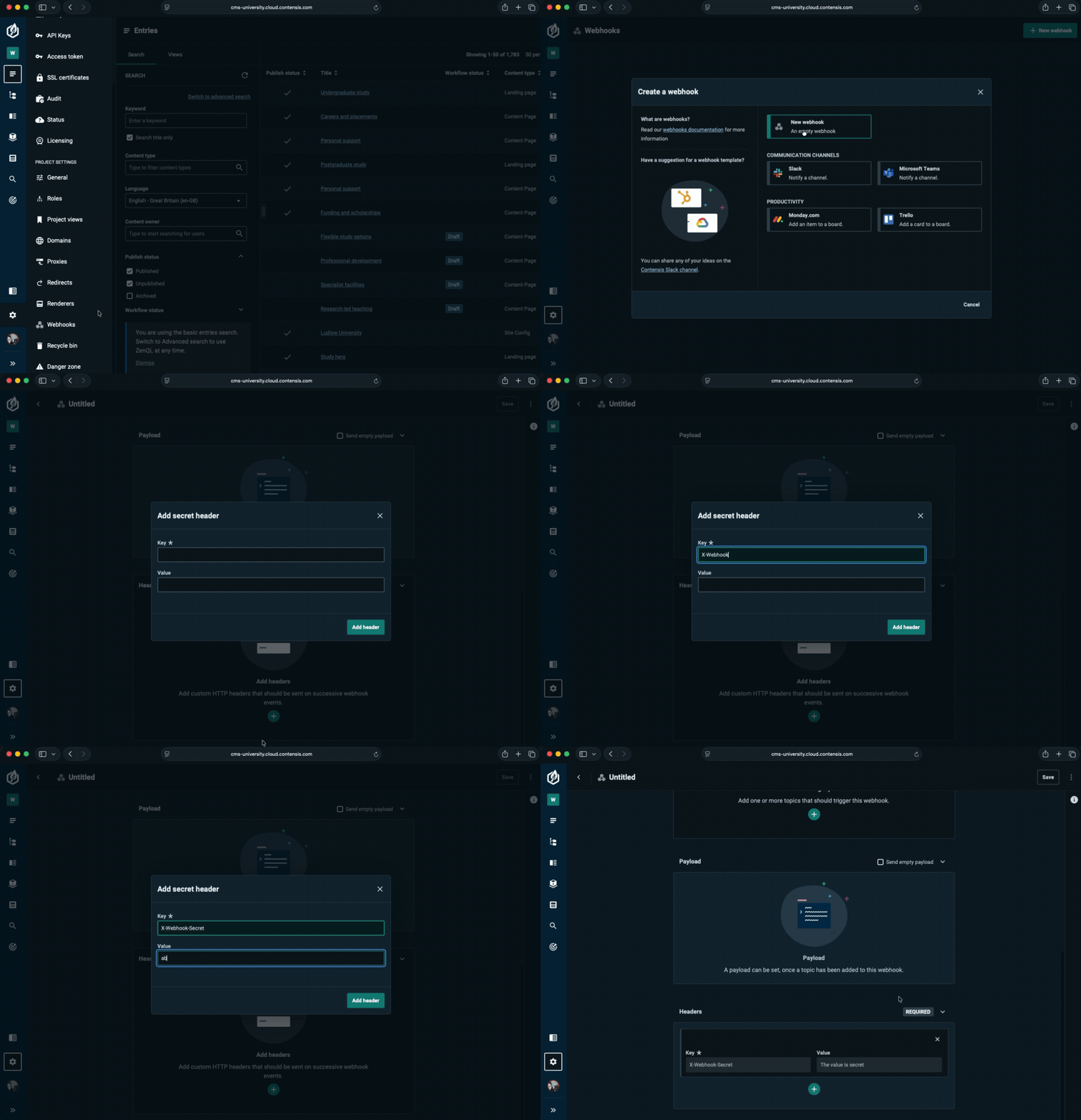
Generate and store your webhook secret
Create a random secret key, for example using a CLI tool or an online key generator, and use it as your shared secret for webhook authentication.
You’ll need to save this secret in your environment so your application can access it at runtime, for example:
WEBHOOK_SECRET=your-random-secret-here
Authentication (e.g. in Express.js)
Here’s a minimal example of verifying the X-Webhook-Secret header.
We recommend implementing webhook authentication as middleware.
This ensures that:
- authentication checks runs first, before any other request handling or business logic
- unauthorized requests are rejected immediately, preventing unnecessary processing
- middleware also keeps your code clean and reusable across multiple webhook endpoints
Example: Applying the middleware in Express.js
// auth-webhook.js
export function validate(req, res, next) {
  const HEADER_NAME = 'x-webhook-secret';
  const RECEIVED_SECRET = req.headers[HEADER_NAME];
  const EXPECTED_SECRET = process.env.WEBHOOK_SECRET;

  // ensure the secret is configured
  if (!EXPECTED_SECRET) {
    return res.status(500).json({ error: 'Error' });
  }

  // check that the header exists
  if (!RECEIVED_SECRET) {
    return res.status(401).json({ error: 'Unauthorized' });
  }

  // compare header value to expected secret
  if (RECEIVED_SECRET !== EXPECTED_SECRET) {
    return res.status(401).json({ error: 'Unauthorized' });
  }

  console.log('Webhook request authenticated successfully');
  next();
}
Example: Entry point in Express.js
// index.js
import express from 'express';
import { validate } from './middleware/auth-webhook';

const app = express();
app.use(express.json());

// authentication middleware runs first
app.post('/webhook', validate, (req, res) => {
    // ...
});
Best practices
- Use HTTPS for all webhook endpoints.
- Keep your secret private – never expose it in logs or responses.
- Rotate secrets periodically, updating both Contensis and your receiver.