

Managing secrets in private Docker images
Log in to add to favouritesPage last updated 09 October 2026
Blocks can receive environment variables at runtime - injected when the container starts, without rebuilding or redeploying. If your application only needs secrets while it's running, use Block environment variables and mark sensitive values as secret so they can't be viewed again once saved.
You only need this article if a secret is required to build or deploy your application.
What are environment variables?
Environment variables are key-value pairs provided by the operating system that influence how applications run. They’re often used to configure paths, enable features, or inject sensitive information like API keys or tokens without hardcoding them into source code.
For example, the following commands print the PATH variable in different environments:
echo $PATH        # macOS/Linux
echo $env:PATH    # PowerShell
echo %PATH%       # Windows CMD
node -e "console.log(process.env.PATH)"  # Node.js
How environment variables are used in development
In the JavaScript ecosystem, environment variables are often defined in a file named .env (or some variation) stored in the project root. This file contains values that are loaded at runtime and made available via process.env in Node.js:
# .env
PRIVATE_API_KEY=abc123node -e "console.log(process.env.PRIVATE_API_KEY)"These variables aren’t available by default - they need to be loaded explicitly in code (or implicitly through build tooling) using packages like dotenv.
Even for client-side web apps, Node.js is commonly used during the build step. Many frameworks (such as Next.js, Vite, or Webpack) allow you to expose specific variables to the frontend by prefixing them or using special loaders, plugins, imports, or comments. This means it's possible - intentionally or accidentally - to embed sensitive variables into client-side bundles.
How environment variables are used in production
Blocks are containers. A container's runtime is a minimal OS with one job - run your application - and it handles environment variables exactly like your desktop OS.
Environment variables could be loaded into production apps at different stages:
- Least secure: Committed in source control and built into the app
- Potentially secure: Build arguments that include them via
ENVcommands in aDockerfile - Most secure: Injected at runtime via Block environment variables - added at the last moment before the container starts, so the secret never exists inside the source code or the built image.
Why we can never call any of these "secure"
Once a secret is baked into an image - via source control or a build argument - two kinds of risk attach to it.
Image and repository risks - the secret is included in every pushed image, and the repository that built it:
- the image is pushed to a public registry, or a private one is later made public
- the repository is made public, or cloned beyond your control
- image layers and registry history keep copies even after a mistake is fixed, so any leak becomes permanent
Application risks - these apply to any secret, however it was delivered:
- a value is written to console output that ends up in shared CI or server logs
- build tooling inlines it into a client-side bundle in a server-rendered app
- it's returned to a browser in a REST response or rendered page
What is a secret?
Environment variables themselves are not always sensitive. Many are harmless configuration flags or tokens used in low-risk contexts.
However, some variables-like API keys, credentials, or private tokens-must be treated as secrets. These values must never be committed to source control or exposed to the public.
For example, in Contensis:
- ✅ Access Token - used to fetch public content from the Delivery API; safe and often exposed in frontend code.
- 🛑 Role-based API Key (Client ID + Secret) - used to manage content; must be kept private and should never be exposed to the client.
The distinction is simple: if exposing a variable can result in unauthorized access or damage, it’s a secret.
Secrets in CI/CD pipelines
In a CI/CD environment like GitHub Actions, secrets are used to safely pass sensitive values into your builds and deployments without storing them in code.
GitHub provides a secure Secrets section in repository settings where you can define these variables. Once stored, their values:
- Can be injected as environment variables in workflows.
- Are write-only - you won’t be able to read them later, only update them.
- Are automatically redacted from CI/CD pipeline logs.
GitLab provides the equivalent feature - CI/CD Variables - in repository settings.
Use this mechanism to store secrets that are required to build and deploy your application, such as:
- Private registry credentials
- Deployment API keys
- Authentication tokens
Using CI provider secrets in builds and Docker images
Once your secrets are safely added to your repository, you can inject them into your CI workflows as environment variables, or Docker build arguments, depending on how your application build expects them.
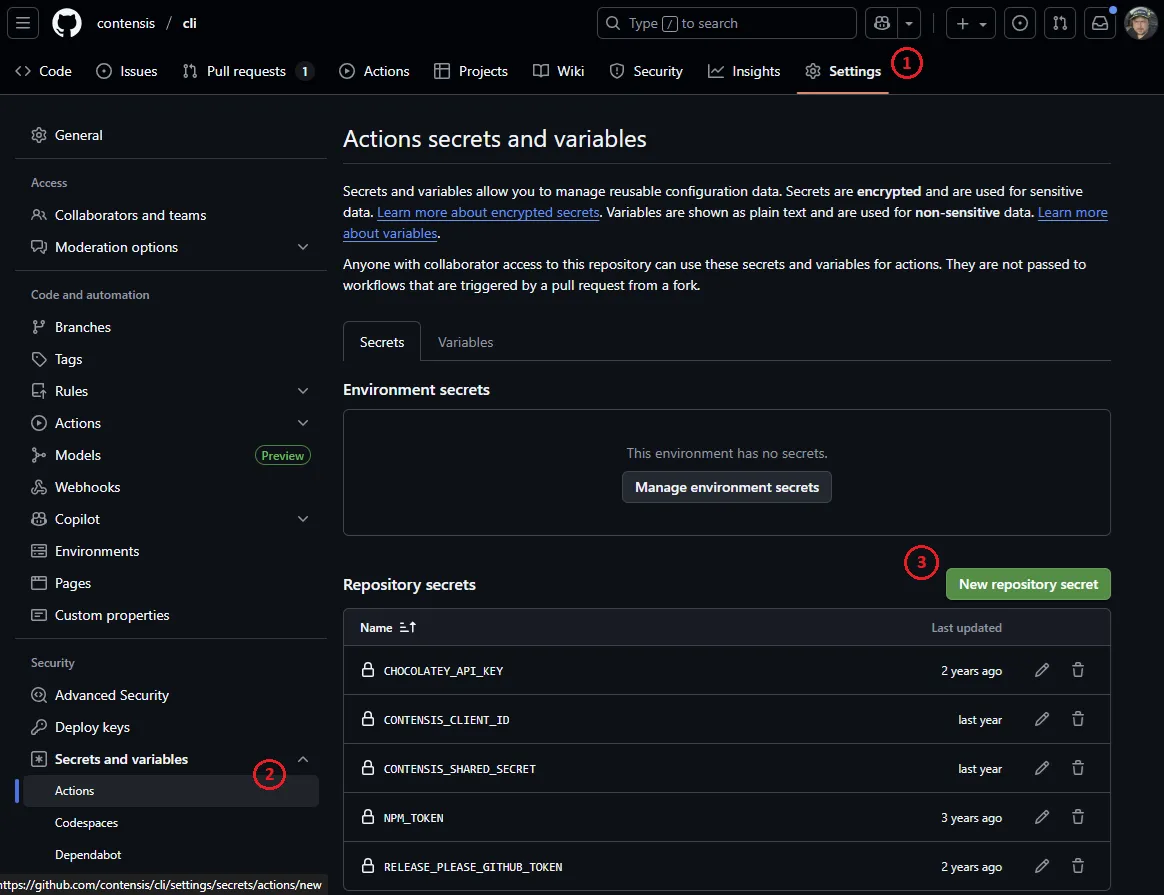
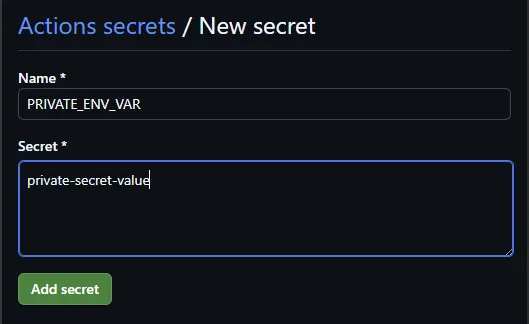
Adding GitHub secrets to the repository
GitHub provides a secure way to manage sensitive values in each repository under Settings → Secrets and variables → Actions.
Add all required secrets here before continuing.
Injecting secrets via .env files in CI
If your application relies on a .env file (or some variation) for its build or deployment steps, you can generate this file during your CI workflow, accessing the secrets stored in GitHub.
Create a .env with secrets:
- name: Generate local .env file containing secrets
  run: |
    cat <<EOF > .env
    PRIVATE_ENV_VAR=${{ secrets.PRIVATE_ENV_VAR }}
    PRIVATE_CLIENT_ID=${{ secrets.PRIVATE_CLIENT_ID }}
    PRIVATE_CLIENT_SECRET=${{ secrets.PRIVATE_CLIENT_SECRET }}
    EOF
Or append secrets to an existing .env file:
- name: Append secrets to local .env file
  run: |
    echo "PRIVATE_ENV_VAR=${{ secrets.PRIVATE_ENV_VAR }}" >> .env
    echo "PRIVATE_CLIENT_ID=${{ secrets.PRIVATE_CLIENT_ID }}" >> .env
    echo "PRIVATE_CLIENT_SECRET=${{ secrets.PRIVATE_CLIENT_SECRET }}" >> .env
Once generated, the .env file will be available to any build step that runs in the same job. It will be discarded automatically once the CI job completes.
Passing secrets to Docker as build arguments
If your application needs secrets to be available at Docker build time (to supply in RUN steps for example), you can pass them using the --build-arg flag.
Update your Dockerfile to define build arguments:
ARG PRIVATE_AUTH_SECRET
ARG PRIVATE_CLIENT_ID
ARG PRIVATE_CLIENT_SECRET

ENV PRIVATE_AUTH_SECRET=$PRIVATE_AUTH_SECRET
ENV PRIVATE_CLIENT_ID=$PRIVATE_CLIENT_ID
ENV PRIVATE_CLIENT_SECRET=$PRIVATE_CLIENT_SECRETUpdate your GitHub Actions workflow to pass those secrets:
- name: Build container image
  env:
    APP_BUILD_IMAGE: ${{ env.APP_IMAGE }}:build-${{ github.run_number }}
    APP_LATEST_IMAGE: ${{ env.APP_IMAGE }}:latest
  run: |
    docker build \
      --build-arg PRIVATE_AUTH_SECRET=${{ secrets.PRIVATE_AUTH_SECRET }} \
      --build-arg PRIVATE_CLIENT_ID=${{ secrets.PRIVATE_CLIENT_ID }} \
      --build-arg PRIVATE_CLIENT_SECRET=${{ secrets.PRIVATE_CLIENT_SECRET }} \
      -t ${{ env.APP_BUILD_IMAGE }} \
-t ${{ env.APP_LATEST_IMAGE }} .Next Steps: Push to Registry and Deploy
After building the container image, you should push it to your container registry. Ensure that your registry is not publicly accessible, as public images can be pulled by anyone.
In GitHub, container images appear under Packages in your repository and are labelled as either Public or Private.
Deploying to Contensis Blocks
If you're deploying your image to a Block, you'll need to:
- Add your private registry credentials to Contensis.
- Integrate the Contensis Block Push GitHub Action or GitLab CI into your CI workflow to deploy the image.
- Configure Block Environment Variables for server-only secrets. These are injected when the deployed Block starts.
You can include the push step as part of your existing build job or as a separate deployment job.
Developer Tips
- Never include private secrets in code that is served to the client - for example, in components that are rendered on both the server and client side
- Restrict the use of private secrets to server-side operations only
- Use Block Environment Variables to inject production secrets at runtime, minimizing the risk of accidental exposure
- Never commit private secrets to source control, unless explicitly agreed upon for a specific, secured use case.
- Be aware that build tools may inline
.env*,process.env.*or special global variables during build time, which can expose secret values in final client-side bundles if used incorrectly. - A secret injected at runtime can still be leaked by your application - never log environment variables or return their values in API responses or rendered pages.
- Avoid pushing container images to public registries if they include private secrets, as this creates a significant risk of data leakage
- Understand that leaks can happen - if a secret is exposed, immediately revoke any public access, inform your team, and rotate any affected keys or credentials as a top priority.